Why Version Control Exists: The Pendrive Problem
Introduction
There was a time—before Git, before GitHub, before “push it” became a daily sentence—when developers lived in a very spiritual state.
Not because they meditated.
Because they had no choice.
One wrong copy-paste, and your entire project could vanish into the void.
This ancient era had a name.
The Pendrive Era.
And today, my fellow developers, we will understand why version control exists… by revisiting this glorious struggle.
What is a “Version” and What is “Version Control”?
Before we go deeper, let’s remove the fog.
What is a “Version”?
A version is simply a saved state of your project at a point in time.
For example:
Version 1: Homepage is created
Version 2: Navbar is added
Version 3: Responsive design fixes done
Version 4: Bug fixed in button click
Each of these is a “version” of the same project.
Even your phone apps have versions like:
v1.0v1.1v2.0
Same idea.
What is “Version Control”?
Version control is a system that manages these versions automatically.
It helps you:
save versions in a clean history
track what changed and why
go back to old versions
collaborate with others without overwriting work
So instead of keeping versions manually as folders, version control tools (like Git) do it for you properly.
The Pendrive Era: A Realistic Story
Now let’s properly understand why those “final” folders exist.
Meet Raj. A hardworking developer. A good soul. A tragic hero.
Raj is building a project called portfolio-website.
He creates a folder:
portfolio/
He finishes the homepage and says:
“Done. I’ll submit this.”
Then his teammate messages:
“Bro, you forgot the contact section.”
Raj panics.
He does what every human did in the Pendrive Era:
He copies the folder and makes a new one:
portfolio_final/
He adds the contact section.
Now the mentor says:
“Nice. But make it responsive.”
Raj panics again.
He creates:
portfolio_final_v2/
He fixes responsiveness.
Then the client says:
“Add a dark mode toggle.”
Raj enters the final stage of folder naming enlightenment:
portfolio_latest_final/
Now here comes the twist.
Raj’s pendrive contains 3 folders.
He forgets which one is correct.
He opens portfolio_final/ by mistake, edits it, and submits it.
Result:
contact section exists
responsiveness is broken again
dark mode is missing
Raj has now achieved true developer spirituality.
Not by meditation.
But by suffering.
Why Pendrive-Based Workflows Failed (The Real Problems)
The pendrive method looks simple, but it breaks instantly in real development.
1) Overwriting Work (The Silent Disaster)
Imagine two developers:
Raj edits
index.htmlSimran also edits
index.html
Both put their files in the pendrive.
Last person to copy wins.
Other person’s work is gone.
No alert. No warning. No “restore.”
Just loss.
2) No Clear History
Your project breaks and someone asks:
“When did this bug start?”
In a pendrive workflow, you only have folder names like:
finalfinal_v2latest_final
These folders don’t explain:
what changed
why it changed
who changed it
That means debugging turns into guesswork.
3) No Way to “Go Back Safely”
Sometimes you need to undo a change.
With folder versions, you can go back… but only if you remember:
which folder is the right one
and which change caused the issue
Usually you don’t.
So developers create more folders.
Which creates more confusion.
This is how chaos multiplies.
4) Collaboration Becomes a Mess
When teams work, they need:
accountability
clarity
traceability
But in pendrive culture:
no one knows who added what
no one knows who broke what
everyone denies everything
This is how “team projects” become “team trauma.”
5) Merging Changes Was Manual Torture
Let’s say:
Raj added a navbar
Simran added a footer
Without version control, combining them becomes:
copy this file from Raj
copy that file from Simran
hope nothing conflicts
if conflicts happen, manually fix line-by-line
This is where developers lost years of their lives.
The Folder Timeline: How It Gets Worse Over Time
Here is the natural evolution of a project without version control:
project/project_final/project_final_v2/project_latest_final/project_latest_final_real/project_submit_this_one/
At this point, even the creator doesn’t know what is correct.
And the pendrive is now carrying confusion.
Not code.
How Version Control Solves This (The Modern World)
Version control replaces messy folder copies with a clean system.
Instead of:
“copy folder → edit file → rename final_v2 → send pendrive”
You now do:
make changes
save a version properly (commit)
see a timeline of changes
collaborate without overwriting
It answers all important questions:
What changed?
Who changed it?
When?
Why?
Can we undo it?
That’s why version control became mandatory.
Not because it’s “cool.”
Because without it, building software becomes survival mode.
Pendrive Workflow vs Version Control Workflow
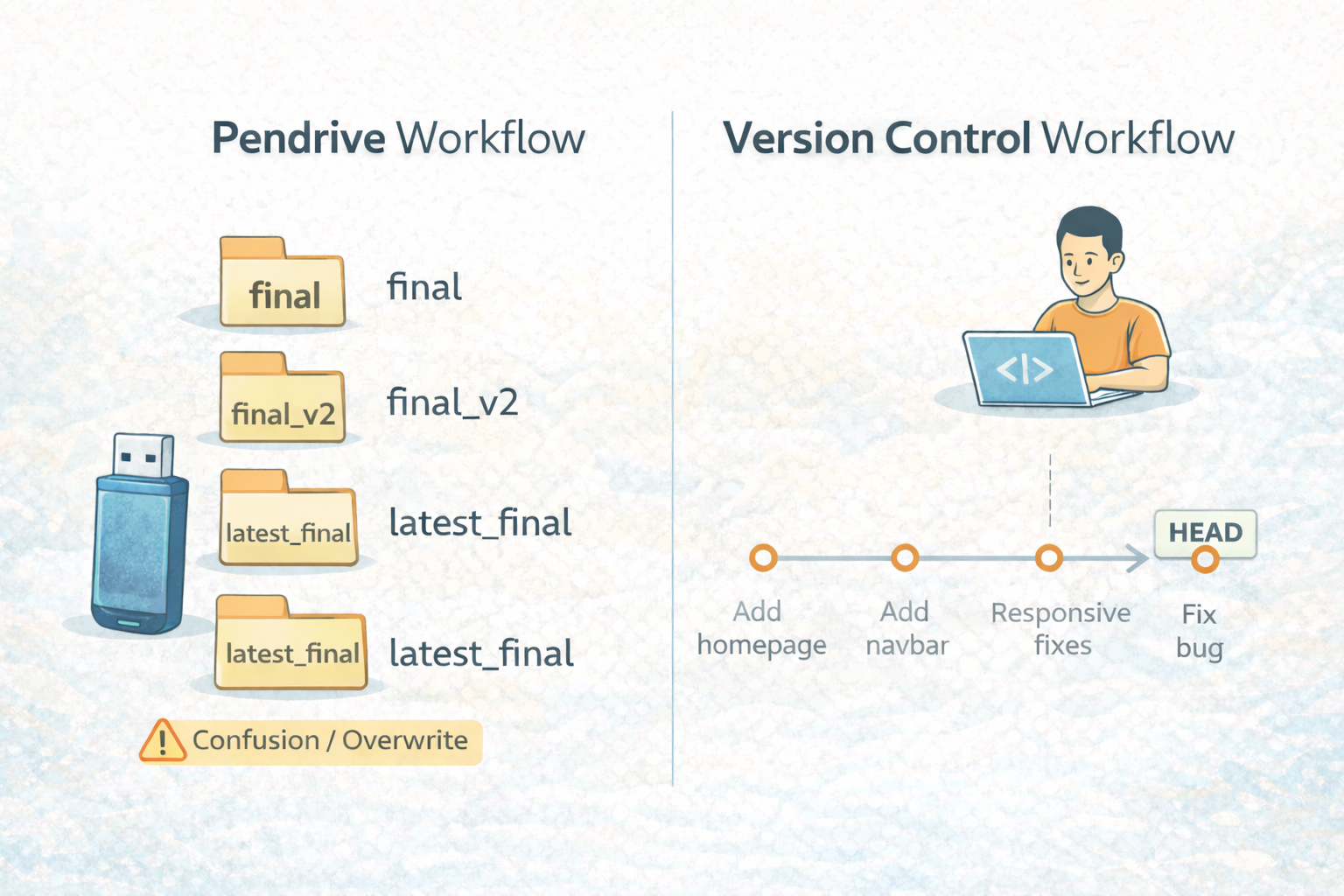
Pendrive workflow creates versions by copying folders manually.
Version control creates versions by saving history automatically.
One causes chaos.
One creates clarity.
Closing Thought
In the old days, developers created folders named final_final_v3.
Today, we create commits with meaning.
And that is progress.


