DNS Record Types Explained
Introduction: How Does a Browser Know Where a Website Lives?
Think about calling someone on your phone.
You don’t dial their phone number every time.
You tap a saved contact name.
Your phone quietly figures out the number and makes the call.
You don’t need to remember their phone number.
That’s exactly why DNS exists.
When you type a website like:
techgyaan.hashnode.dev
your browser doesn’t understand names.
It needs a numeric address (IP) to reach the server.
DNS is the system that translates:
human-friendly names → machine-friendly addresses
If you want to deeply understand how DNS resolution actually works step by step, I’ve already covered that in detail here:
In this article, we’ll build on top of that knowledge and focus on something equally important:
DNS Record Types — the actual instructions stored inside DNS
Before Records: Why Root, TLD & Authoritative Servers Exist
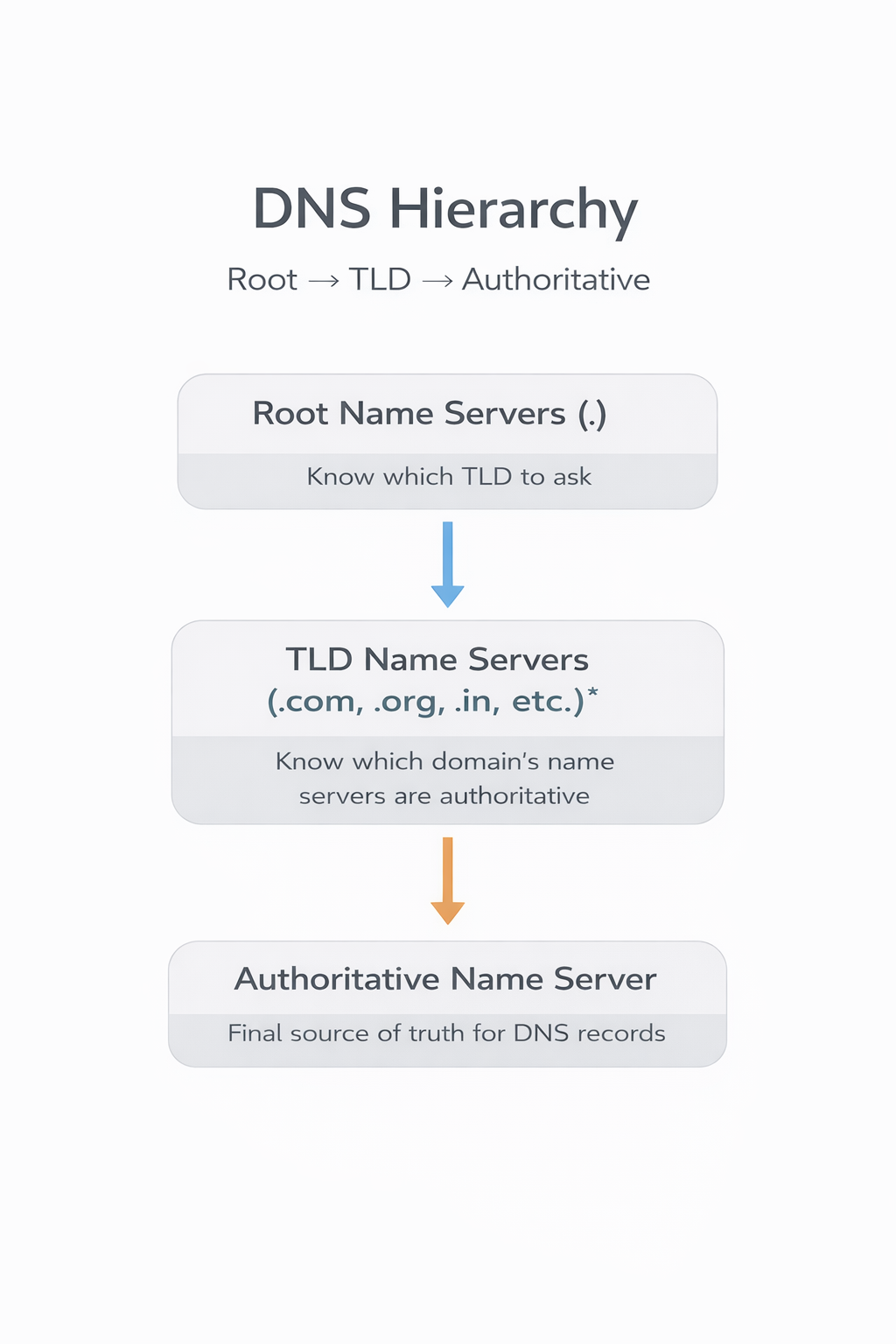
A very common beginner question is:
“Why so many levels?
Why not just ask one server and get the answer?”
Great question.
Why Not Just One DNS Server?
Imagine if one single server stored DNS records for every domain on the internet.
Problems:
Too slow
Too big
Single point of failure
Impossible to manage globally
Why Not Just Two Levels?
If root servers directly knew every domain:
Root servers would become overloaded
Every small DNS change would affect the root
So DNS Is Split Into Levels
DNS works like a government address system:
| DNS Level | Real-Life Analogy |
| Root | Country index |
| TLD (.com, .dev) | City registry |
| Authoritative | Exact house address |
Each level answers only one responsibility, nothing more.
This design makes DNS:
Scalable
Fast
Reliable
Decentralized
Why DNS Records Exist (The Real Problem They Solve)
Think of DNS like a well-organized office, not just a phonebook.
Different questions need different answers:
Where does this website live?
Who is responsible for this domain?
Where should emails be delivered?
Is this domain verified for some service?
A single “name → IP” mapping is not enough.
So DNS stores multiple types of records, each solving one specific problem.
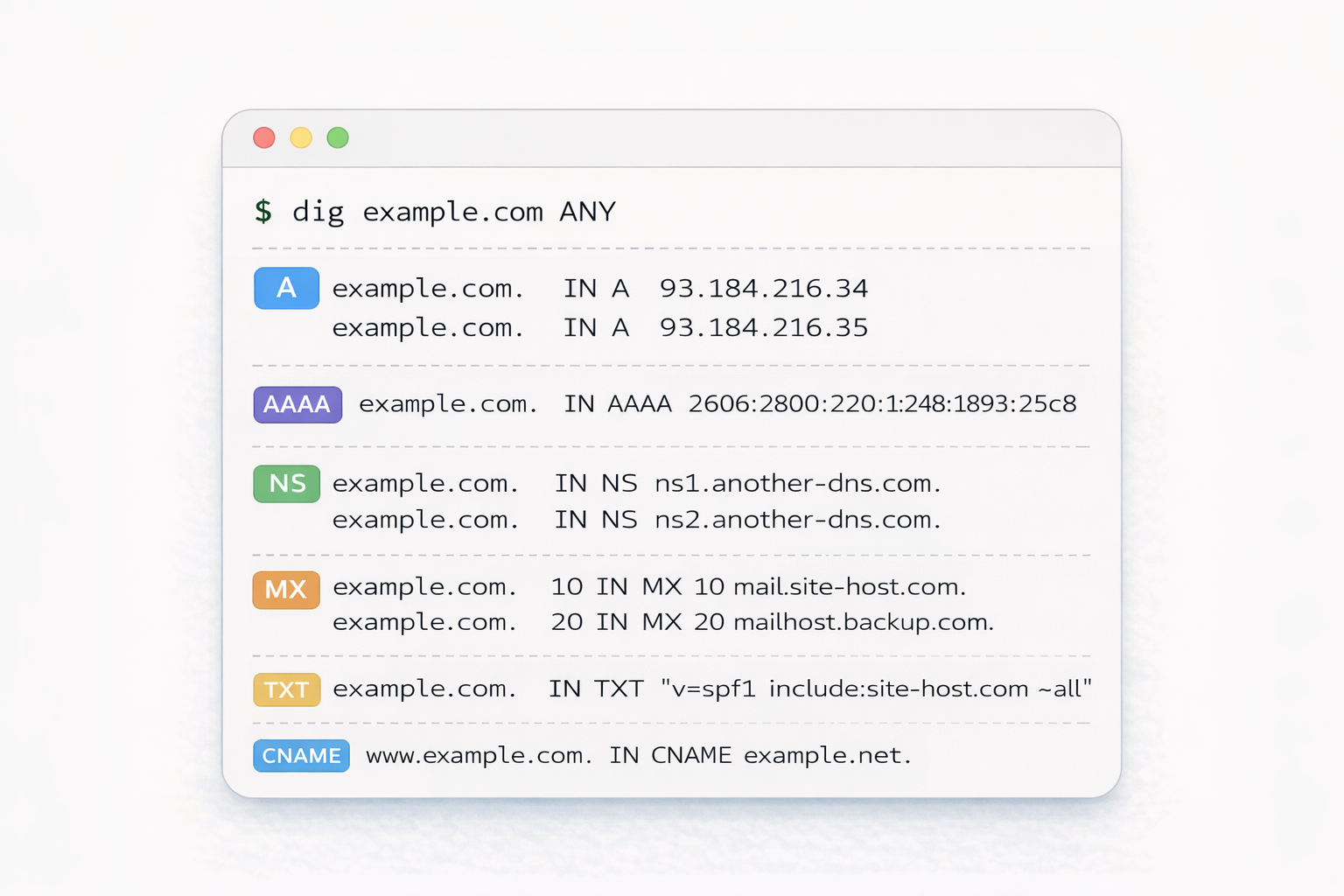
These are called DNS Record Types.
We’ll understand them one by one, using simple analogies.
What Is an NS Record? (Who Is Responsible)
NS = Name Server
An NS record answers one question:
“Who is responsible for this domain?”
Analogy
Think of NS like:
“Which office manages records for this area?”
Example:
example.com → handled by these name servers
NS records don’t give IPs directly.
They tell where the source of truth lives.
Without NS records, DNS hierarchy would collapse.
What Is an A Record? (Name → IPv4 Address)
A = Address
This is the most famous DNS record.
It answers:
“What is the IPv4 address of this domain?”
Example:
example.net → 93.184.216.34
Analogy
A record is like:
“House number of this person”
Browser finally uses this IP to connect to the server.
What Is an AAAA Record? (IPv6 Version)
Same job as A record, but for IPv6.
Example:
example.net → 2606:2800:220:1:248:1893:25c8:1946
Why it exists:
IPv4 addresses are limited
IPv6 is the future
What Is a CNAME Record? (One Name Points to Another)
CNAME = Canonical Name
Instead of giving an IP, it points to another domain name.
Example:
www.example.com → example.net
example.net → 93.184.216.34
Why Not Direct IP?
Because:
You can change the IP in one place
Multiple names can point to one main domain
Analogy
CNAME is like:
“If you’re looking for me, ask my assistant.”
What Is an MX Record? (How Emails Find Servers)
MX = Mail Exchange
MX records answer:
“Where should emails for this domain go?”
Example:
example.com → mail.google.com
Analogy
MX record is like:
“All letters for this house go to this post office”
Web traffic and email traffic are completely separate.
That’s why MX exists.
What Is a TXT Record? (Extra Information & Verification)
TXT records store plain text.
Used for:
Domain verification
SPF / DKIM (email security)
Ownership proofs
Example:
"google-site-verification=abc123"
Analogy
TXT records are like:
“Notes pinned on your house gate for inspectors”
Not for visitors.
Only for systems that know what to look for.
They don’t route traffic — they prove and explain things.
How All DNS Records Work Together (One Website Example)
For a single website, DNS may contain:
NS → who manages it
A / AAAA → where the server lives
CNAME → aliases
MX → email routing
TXT → verification & security
DNS is not one record.
It’s a system of instructions working together.
Common Beginner Confusions
A vs CNAME
A → points directly to IP
CNAME → points to another name
NS vs MX
NS → DNS responsibility
MX → email delivery
Different problems, different records.
Closing Thought
DNS records are not scary.
They’re just clear instructions that tell the internet:
where things live
who manages what
how traffic should flow
Once you see them as problem-solvers, DNS starts to feel simple — even elegant


